

You capture places and objects in 3D, as Gaussian splats
Walk through.
On an Android phone or tablet, or on Windows, Linux and macOS, and you walk through the scene.
Experimental
 Android phones and tablets
 Meta Quest
 Windows
 macOS
 Linux
Explore Gaussian splats on your phone, tablet or computer
A splat made with Polycam, Scaniverse, Postshot, Luma or another tool, or one your computer made from your photos, opens on an Android phone or tablet and on Windows, Linux and macOS, and you walk through it as in a headset. The Immich app opens no splat.
- Put your .spz or .ply splats on an SMB or WebDAV share or in a folder of the phone ("Browse a folder"), or pick one with "Open a splat file" in the + menu of Network shares; on a computer, a splat file opened with the program or dropped on its window opens at once. Splats come after the photos and videos, with a "3D splat" badge and their number of gaussians.
- Open one: a place opens around you, an object in front of you. On a computer, drag to look around, walk with W, A, S, D (Z, Q, S, D on AZERTY) or the arrows, go forward and back with the wheel, up and down with E and Q, and press R to reset and Esc to go back; "Turn around" turns about an object instead of walking. On a phone, your left thumb walks, a drag looks around, a pinch goes forward and back, two fingers slide and a double tap resets; the gyroscope button looks around as you turn the phone.
- Reset places the scene again, "Turn upright" turns one that comes in lying down or upside down, remembered for that file on this device, and the info sheet says how many gaussians are shown and how fast they are drawn.
Explore Gaussian splats in a Meta Quest 3 or 3S
A Gaussian splat is a 3D capture of a place or an object, made with Polycam, Scaniverse, Postshot, Luma and other tools. In a Meta Quest 3 or 3S, Immuch360 sets it in front of you or all around you, at its size, and you walk around it or glide through it.
- Put your .spz or .ply splats on an SMB or WebDAV share, or in a folder of the headset ("Browse a folder", or "Open a splat file" in the + menu of Network shares). They come after the photos and videos, with a "3D splat" badge and their number of gaussians.
- Open one, then "Explore the splat scene". An object stands in front of you at eye height, a place opens around you. The left thumbstick glides through it, and the right thumbstick turns the view 30° about you, keeping the spot you reached ("Reverse thumbstick turn" turns it the other way). Reset, in the panel that A, X or grip shows, places it again from where you stand, and "Turn upright" turns one that comes in lying down or upside down, remembered for that file.
- The headset reads binary .ply files and SPZ versions 1 to 4, version 4 from build 40.
Make a splat scene from your photos or a video (AI)
You filmed a room, a garden or a statue and would like to stand in it again. On a Windows computer, Immuch360 Desktop rebuilds it from your photos or a video as a Gaussian splat, which you walk through in a Meta Quest 3 or 3S or in the splat viewer above. Everything runs on your computer: no cloud, no account. The Immich app has nothing like it.
- Film slowly, or take a photo at every step, each one seeing most of what the previous one saw. For a place, walk along the walls looking across it, then through the middle; for an object, walk around it twice, at its height then from a little above. Even light, no zoom, nothing moving; avoid mirrors, windows against the light and shiny surfaces.
- Select the photos or the video, in the library or a folder, then "Make a splat scene (AI)", and say what you filmed: "A place: a room, a street, a garden" or "An object, walked around". The box says which photos it leaves out and why, what the headset will get (up to 150,000 gaussians), about how long it takes on this computer, and where the file goes: next to the photos, or a folder of your choice. "Also save a .ply for other 3D apps" keeps the same gaussians as a .ply too.
- The box offers its two components, to download once: COLMAP 4.2.1 (BSD 3 Clause), about 10 MB, which places the photos in 3D on the processor, and Brush 0.3.0 (Apache 2.0), about 16 MB, which trains the splat on the graphics card.
- "Make the scene". The panel shows each step, taking the frames, placing the photos in 3D, training the splat, with the time left, and Cancel stops it. On a laptop with an RTX 4060, about 12 minutes for 150 photos of a room, and 8 for a one minute video of an object.
- The scene,
<name>_splat.spz, goes next to the photos or into your folder. Open it in the headset from your NAS or from its Download folder ("Large splats", in its Settings, Advanced, shows all of it), or in the splat viewer of a computer, a phone or a tablet, where "Save to Immich" keeps it on your server. An object is cropped around it for the headset, so that it opens in front of you; the .ply keeps the whole scene.
Keep a splat scene on your Immich server
An Immich server does not take .spz or .ply files. Immuch360 saves a splat scene inside a photo of it, <name>_splat.jpg, which any Immich server keeps like any other photo: it shows in the timeline of all your devices, and Immuch360 opens the scene from it.
- In the splat viewer of a computer, an Android phone or a tablet, walk to a view you like, then "Save to Immich": the view you see becomes its photo, in your timeline on the scene's date and in the album "Splat scenes". Several splats of a share or a folder: select them, then "Upload to Immich". A .ply is saved as an SPZ, compressed with a slight loss.
- Open the photo in your timeline, then "Explore the splat scene": on a computer, an Android phone or tablet, or a Meta Quest 3 or 3S with the GitHub build. Each device downloads the scene once (on mobile data, it asks before a large one), then opens it at once, offline too.
- The photo carries a small 3D mark in a corner, so that you tell it apart in Immich and other apps; "Mark the photos of saved splat scenes", in Settings, Advanced, leaves it out of the next ones.
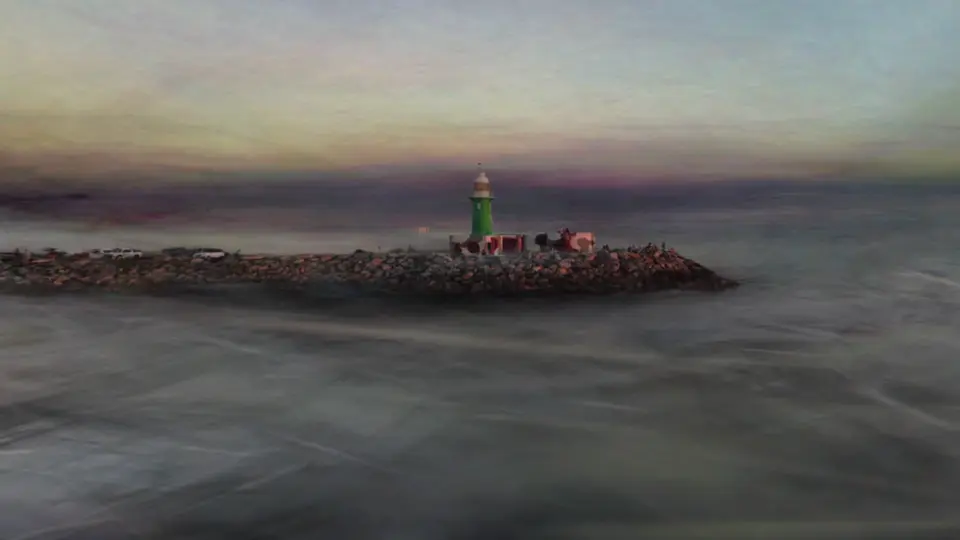
Scene: JamesBromberger, Wikimedia Commons, CC0
On which screens
| On which screens | Phone and tablet | Computer | Meta Quest | TV |
|---|---|---|---|---|
| Gaussian splats, .spz and .plyExperimental | Yes | Yes | Yes | |
| Splat scenes kept as photos in ImmichExperimental | Yes | Yes | ||
| Splat scene from photos or a video (AI)Experimental | Yes |

Get it on your screens.
GitHub
Windows · macOS · Linux · Android TV · LG · Samsung · APK
Build 42 on GitHub, 6 November 2026 · Desktop build 22, 6 November 2026